
Back to blog
Research

How to Use x402 with Token Metrics: Composer Walkthrough + Copy-Paste Axios/HTTPX Clients

Learn x402 in two parts: first, use Token Metrics tools in Composer and watch paid API calls happen live. Then, build your own client with production-ready Axios and Python code that auto-handles payment flows.
Token Metrics Team
9 min read
Want Smarter Crypto Picks—Free?
See unbiased Token Metrics Ratings for BTC, ETH, and top alts.
Thank you! Your submission has been received!
Oops! Something went wrong while submitting the form.
 No credit card | 1-click unsubscribe

What You Will Learn — Two-Paragraph Opener

This tutorial shows you how to use x402 with Token Metrics in two ways. First, we will walk through x402 Composer, where you can run Token Metrics agents, ask questions, and see pay-per-request tool calls stream into a live Feed with zero code. Second, we will give you copy-paste Axios and HTTPX clients that handle the full x402 flow (402 challenge, wallet payment, automatic retry) so you can integrate Token Metrics into your own apps.

Whether you are exploring x402 for the first time or building production agent workflows, this guide has you covered. By the end, you will understand how x402 payments work under the hood and have working code you can ship today. Let's start with the no-code option in Composer.

Start using Token Metrics X402 integration here. https://www.x402scan.com/server/244415a1-d172-4867-ac30-6af563fd4d25 

Part 1: Try x402 + Token Metrics in Composer (No Code Required)

x402 Composer is a playground for AI agents that pay per tool call. You can test Token Metrics endpoints, see live payment settlements, and understand the x402 flow before writing any code.

What Is Composer?

Composer is x402scan's hosted environment for building and using AI agents that pay for external resources via x402. It provides a chat interface, an agent directory, and a real-time Feed showing every tool call and payment across the ecosystem. Token Metrics endpoints are available as tools that agents can call on demand.

Explore Composer: https://x402scan.com/composer

Step-by-Step Walkthrough

Follow these steps to run a Token Metrics query and watch the payment happen in real time.

  1. Open the Composer agents directory: Go to https://x402scan.com/composer/agents and browse available agents. Look for agents tagged with "Token Metrics" or "crypto analytics." Or check our our integration here. https://www.x402scan.com/server/244415a1-d172-4867-ac30-6af563fd4d25 
  2. Select an agent: Click into an agent that uses Token Metrics endpoints (for example, a trading signals agent or market intelligence agent). You will see the agent's description, configured tools, and recent activity.
  3. Click "Use Agent": This opens a chat interface where you can run prompts against the agent's configured tools.
  4. Run a query: Type a question that requires calling a Token Metrics endpoint, for example "Give me the latest TM Grade for Ethereum" or "What are the top 5 moonshot tokens right now?" and hit send.
  5. Watch the Feed: As the agent processes your request, it will call the relevant Token Metrics endpoint. Open the Composer Feed (https://x402scan.com/composer/feed) in a new tab to see the tool call appear in real time with payment details (USDC or TMAI amount, timestamp, status).
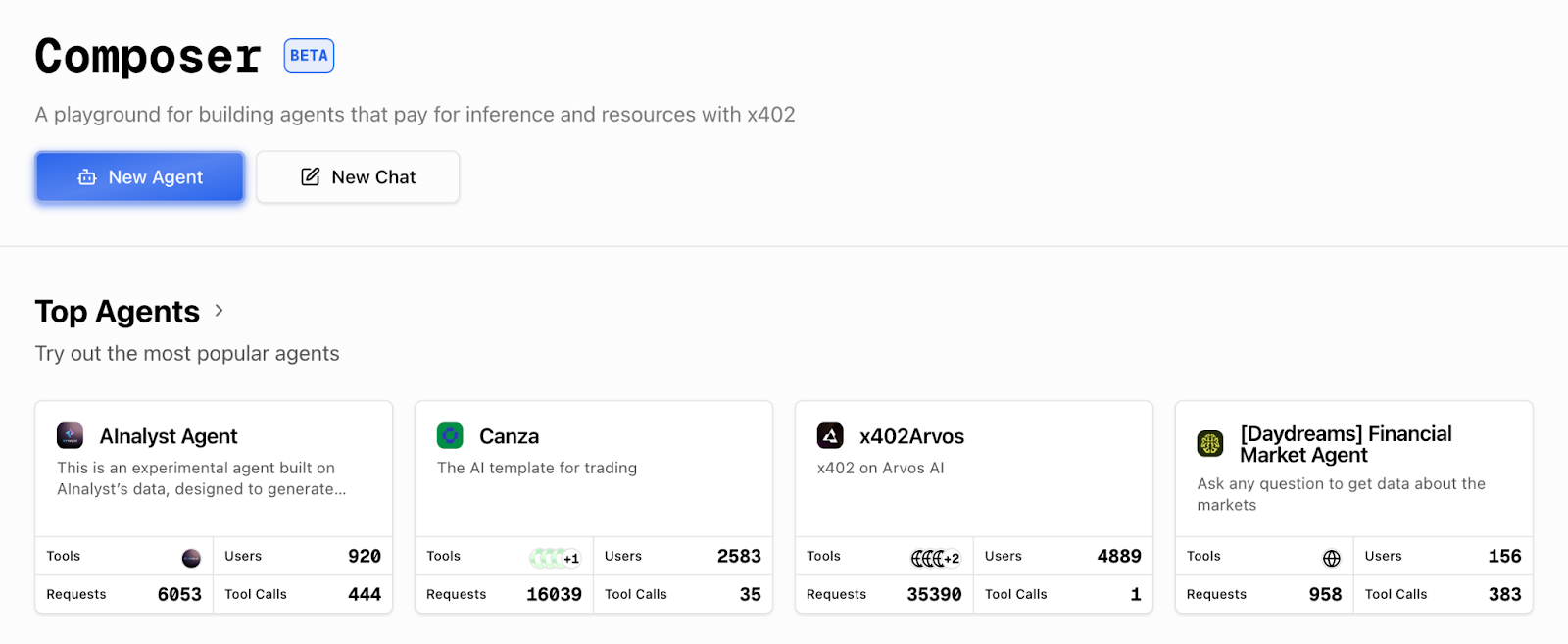
 

Composer agents directory: Composer Agents page: Each agent shows tool stack, messages, and recent activity.
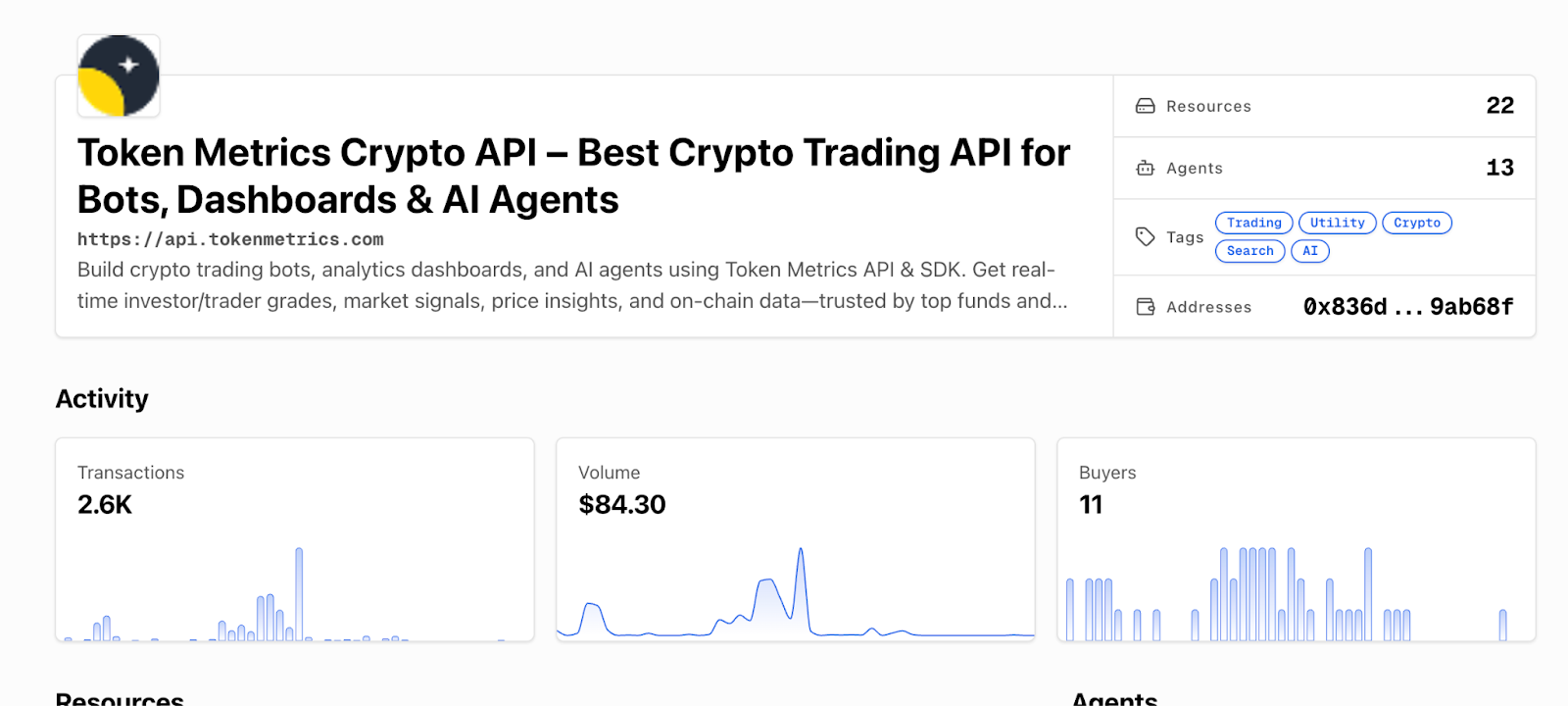
 

Individual agent page: Agent detail page: View tools, description, and click "Use Agent" to start.

[INSERT SCREENSHOT: Chat interface]

Chat interface: Chat UI: Ask a question like "What are the top trading signals for BTC today?"

[INSERT SCREENSHOT: Composer Feed]

Composer Feed: Live Feed: Each tool call shows the endpoint, payment token, amount, and settlement status.

That is the x402 flow in action. The agent's wallet paid for the API call automatically, the server verified payment, and the data came back. No API keys, no monthly bills, just pay-per-use access.

Key Observations from Composer

  • Tool calls show the exact endpoint called (like /v2/tm-grade or /v2/moonshot-tokens)
  • Payments display in USDC or TMAI with the per-call cost
  • The Feed updates in real time, you can see other agents making calls across the ecosystem
  • You can trace each call back to the agent and message that triggered it
  • This is how agentic commerce works: agents autonomously pay for resources as needed

Part 2: Build Your Own x402 Client (Axios + HTTPX)

Now that you have seen x402 in action, let's build your own client that can call Token Metrics endpoints with automatic payment handling.

How x402 Works (Quick Refresher)

When you make a request with the x-coinbase-402 header, the Token Metrics API returns a 402 Payment Required response with payment instructions (recipient address, amount, chain). Your x402 client reads this challenge, signs a payment transaction with your wallet, submits it to the blockchain, and then retries the original request with proof of payment. The server verifies the settlement and returns the data. The x402-axios and x402 Python libraries handle this flow automatically.

Prerequisites

  • A wallet with a private key (use a testnet wallet for development on Base Sepolia, or a mainnet wallet for production on Base)
  • USDC or TMAI in your wallet (testnet USDC for testing, mainnet tokens for production)
  • Node.js 18+ and npm (for Axios example) or Python 3.9+ (for HTTPX example)
  • Basic familiarity with async/await patterns

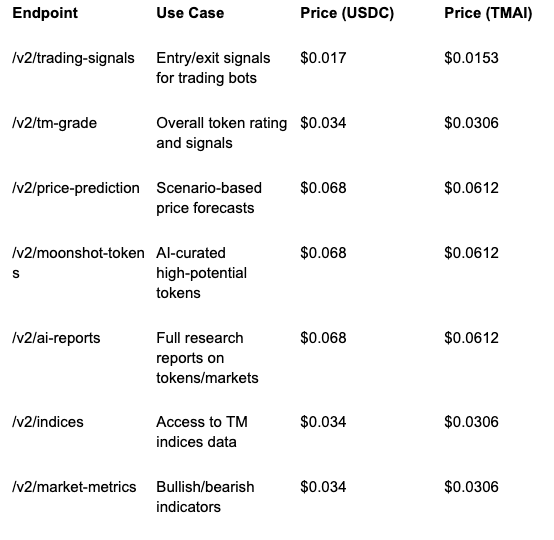
Recommended Token Metrics Endpoints for x402

These endpoints are commonly used by agents and developers building on x402. All are pay-per-call with transparent pricing.

Full endpoint list and docs: https://developers.tokenmetrics.com 
Common Errors and How to Fix Them

Here are the most common issues developers encounter with x402 and their solutions.

Error: Payment Failed (402 Still Returned After Retry)

This usually means your wallet does not have enough USDC or TMAI to cover the call, or the payment transaction failed on-chain.

  • Check your wallet balance on Base (use a block explorer or your wallet app)
  • Make sure you are on the correct network (Base mainnet for production, Base Sepolia for testnet)
  • Verify your private key has permission to spend the token (no allowance issues for most x402 flows, but check if using a smart contract wallet)
  • Try a smaller request or switch to a cheaper endpoint to test

Error: Network Timeout

x402 requests take longer than standard API calls because they include a payment transaction. If you see timeouts, increase your client timeout.

  • Set timeout to at least 30 seconds (30000ms in Axios, 30.0 in HTTPX)
  • Check your RPC endpoint is responsive (viem/eth-account uses public RPCs by default, which can be slow)
  • Consider using a dedicated RPC provider (Alchemy, Infura, QuickNode) for faster settlement

Error: 429 Rate Limit Exceeded

Even with pay-per-call, Token Metrics enforces rate limits to prevent abuse. If you hit a 429, back off and retry.

  • Implement exponential backoff (wait 1s, 2s, 4s, etc. between retries)
  • Spread requests over time instead of bursting
  • For high-volume use cases, contact Token Metrics to discuss rate limit increases

Error: Invalid Header or Missing x-coinbase-402

If you forget the x-coinbase-402: true header, the server will treat your request as a standard API call and may return a 401 Unauthorized if no API key is present.

  • Always include x-coinbase-402: true in headers for x402 requests
  • Do not send x-api-key when using x402 (the header is mutually exclusive)
  • Double-check header spelling (it is x-coinbase-402, not x-402 or x-coinbase-payment)

Production Tips

  • Use environment variables for private keys, never hardcode them
  • Set reasonable max_payment limits to avoid overspending (especially with TMAI)
  • Log payment transactions for accounting and debugging
  • Monitor your wallet balance and set up alerts for low funds
  • Test thoroughly on Base Sepolia testnet before going to mainnet
  • Use TMAI for production to get the 10% discount on every call
  • Cache responses when possible to reduce redundant paid calls
  • Implement retry logic with exponential backoff for transient errors

Why This Matters for Agents

Traditional APIs force agents to carry API keys, which creates security risks and requires human intervention for key rotation and billing. With x402, agents can pay for themselves using wallet funds, making them truly autonomous. This unlocks agentic commerce where AI systems compose services on the fly, paying only for what they need without upfront subscriptions or complex auth flows.

For Token Metrics specifically, x402 means agents can pull real-time crypto intelligence (signals, grades, predictions, research) as part of their decision loops. They can chain our endpoints with other x402-enabled tools like Heurist Mesh (on-chain data), Tavily (web search), and Firecrawl (content extraction) to build sophisticated, multi-source analysis workflows. It is HTTP-native payments meeting real-world agent use cases.

FAQs

Can I use the same wallet for multiple agents?

Yes. Each agent (or client instance) can use the same wallet, but be aware of nonce management if making concurrent requests. The x402 libraries handle this automatically.

Do I need to approve token spending before using x402?

No. The x402 payment flow uses direct transfers, not approvals. Your wallet just needs sufficient balance.

Can I see my payment history?

Yes. Check x402scan (https://x402scan.com/composer/feed) for a live feed of all x402 transactions, or view your wallet's transaction history on a Base block explorer.

What if I want to use a different payment token?

Currently x402 with Token Metrics supports USDC and TMAI on Base. To request support for additional tokens, contact Token Metrics.

How do I switch from testnet to mainnet?

Change your viem chain from baseSepolia to base (in Node.js) or update your RPC URL (in Python). Make sure your wallet has mainnet USDC or TMAI.

Can I use x402 in browser-based apps?

Yes, but you will need a browser wallet extension (like MetaMask or Coinbase Wallet) and a frontend-compatible x402 library. The current x402-axios and x402-python libraries are designed for server-side or Node.js environments.

Next Steps

Disclosure

Educational and informational purposes only. x402 involves crypto payments on public blockchains. Understand the risks, secure your private keys, and test thoroughly before production use. Token Metrics does not provide financial advice.

Quick Links

About Token Metrics

Token Metrics provides powerful crypto analytics, signals, and AI-driven tools to help you make smarter trading and investment decisions. Start exploring Token Metrics ratings and APIs today for data-driven success.

Build Smarter Crypto Apps &
AI Agents in Minutes, Not Months
Real-time prices, trading signals, and on-chain insights all from one powerful API.
Grab a Free API Key
About Token Metrics
Token Metrics: AI-powered crypto research and ratings platform. We help investors make smarter decisions with unbiased Token Metrics Ratings, on-chain analytics, and editor-curated “Top 10” guides. Our platform distills thousands of data points into clear scores, trends, and alerts you can act on.
30 Employees
analysts, data scientists, and crypto engineers
Daily Briefings
concise market insights and “Top Picks”
Transparent & Compliant
Sponsored ≠ Ratings; research remains independent
Want Smarter Crypto Picks—Free?
See unbiased Token Metrics Ratings for BTC, ETH, and top alts.
Thank you! Your submission has been received!
Oops! Something went wrong while submitting the form.
 No credit card | 1-click unsubscribe
Token Metrics Team
Token Metrics Team

Recent Posts

Research

Fundamental Grade Crypto API: Real Crypto Fundamentals in One Score

Token Metrics Team
3

Most traders chase price action; Fundamental Grade Crypto API helps you see the business behind the token—community traction, tokenomics design, exchange presence, VC signals, and DeFi health—consolidated into one score you can query in code. In a few minutes, you’ll fetch Fundamental Grade, render it in your product, and ship a due-diligence UX that drives trust. Start by grabbing your key at the Get API Key page, Run Hello-TM to verify your first call, then Clone a Template to go live fast.

What You’ll Build in 2 Minutes

A minimal script to fetch Fundamental Grade from /v2/fundamental-grade for any symbol (e.g., BTC).

  • Optional curl to smoke-test your key in seconds.
  • A drop-in pattern to display the grade + key drivers in dashboards, screeners, and research tools.

Endpoints to consider next

  • /v2/tm-grade (technical/sentiment/momentum)
  • /v2/price-prediction (scenario planning)
  • /v2/resistance-support (risk levels)
  • /v2/quantmetrics (risk/return stats)

Why This Matters

Beyond price, toward quality. Markets are noisy—hype rises and fades. Fundamental Grade consolidates hard-to-track signals (community growth, token distribution, liquidity venues, investor quality, DeFi integrations) into a clear, comparable score. You get a fast “is this worth time and capital?” answer for screening, allocation, and monitoring.

Build trust into your product. Whether you run an investor terminal, exchange research tab, or a portfolio tool, Token Metrics discovery helps users justify positions. Pair it with TM Grade or Quantmetrics for a balanced picture: what to buy (fundamentals) and when to act (signals/levels).

Where to Find

The Fundamental Grade is easily accessible in the top right of the API Reference. Grab the cURL request for seamless access!

Ready to build?

  • Get API Key — generate a key and start free.
  • Run Hello-TM — verify your first successful call.
  • Clone a Template — deploy a screener or token page today.

Watch the demo: VIDEO_URL_HERE. Compare plans: Scale confidently with API plans.

FAQs

1) What does the Fundamental Grade API return?

A JSON payload with the overall score/grade plus component scores (e.g., community, tokenomics, exchange presence, VC backing, DeFi health) and timestamps. Use the overall grade for ranking and component scores for explanations.

2) How fast is the endpoint? Do you publish SLOs?

The API is engineered for predictable latency. For high-traffic dashboards, add short-TTL caching and batch requests; for alerts, use jobs/webhooks to minimize round-trips.

3) Can I combine Fundamental Grade with TM Grade or signals?

Yes. A common pattern is Fundamental Grade for quality filter + TM Grade for technical/sentiment context + Trading Signals for timing and Support/Resistance for risk placement.

4) How “accurate” is the grade?

It’s an opinionated synthesis of multiple inputs—not financial advice. Historical studies can inform usage, but past performance doesn’t guarantee future results. Always layer risk management and testing.

5) Do you offer SDKs and examples?

You can use REST directly (see JS/Python above). The docs include quickstarts, Postman, and ready-to-clone templates—start with Run Hello-TM.

6) Polling vs webhooks for fundamentals updates?

For UI pages, cached polling works well. For event-style notifications (upgrades/downgrades), prefer webhooks or scheduled jobs to avoid spiky traffic.

7) What about pricing, limits, and enterprise SLAs?

Begin free and scale as you grow. See API plans for allowances; enterprise SLAs and support are available—contact us.

Research

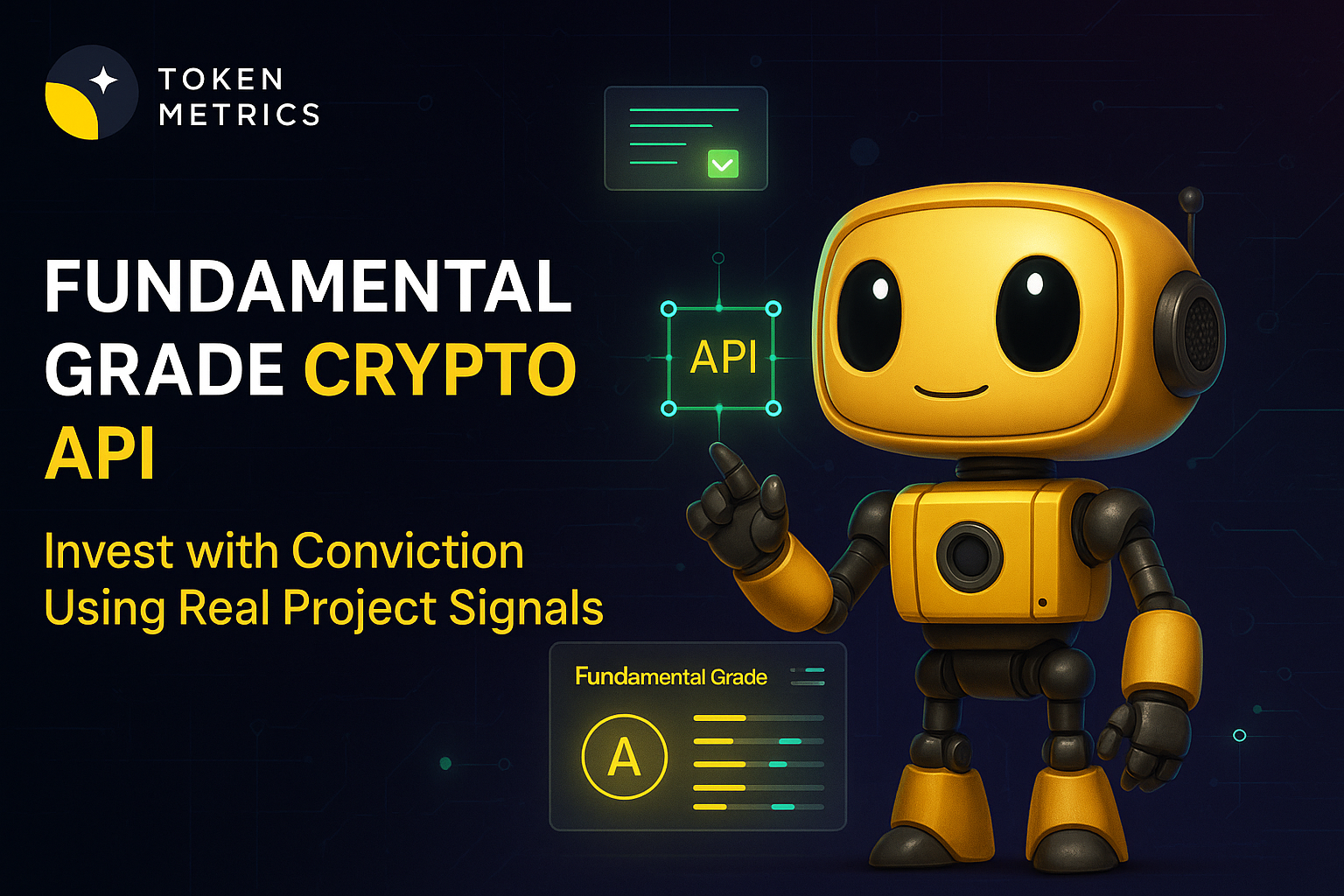
Fundamental Grade Crypto API: Invest with Conviction Using Real Project Signals

Token Metrics Team
4

Most traders chase price action; Fundamental Grade Crypto API helps you see the business behind the token—community traction, tokenomics design, exchange presence, VC signals, and DeFi health—consolidated into one score you can query in code. In a few minutes, you’ll fetch Fundamental Grade, render it in your product, and ship a due-diligence UX that drives trust. Start by grabbing your key at the Get API Key page, Run Hello-TM to verify your first call, then Clone a Template to go live fast.

What You’ll Build in 2 Minutes

A minimal script to fetch Fundamental Grade from /v2/fundamental-grade for any symbol (e.g., BTC).

  • Optional curl to smoke-test your key in seconds.
  • A drop-in pattern to display the grade + key drivers in dashboards, screeners, and research tools.

Endpoints to consider next:

  • /v2/tm-grade (technical/sentiment/momentum)
  • /v2/price-prediction (scenario planning)
  • /v2/resistance-support (risk levels)
  • /v2/quantmetrics (risk/return stats)

Why This Matters

Beyond price, toward quality. Markets are noisy—hype rises and fades. Fundamental Grade consolidates hard-to-track signals (community growth, token distribution, liquidity venues, investor quality, DeFi integrations) into a clear, comparable score. You get a fast “is this worth time and capital?” answer for screening, allocation, and monitoring.

Build trust into your product. Whether you run an investor terminal, exchange research tab, or a portfolio tool, Fundamental Grade lets users justify positions. Pair it with TM Grade or Quantmetrics for a balanced picture: what to buy (fundamentals) and when to act (signals/levels).

Where to Find The Fundamental Grade

The Fundamental Grade is easily accessible in the top right of the API Reference. Grab the cURL request for seamless access!

Build Smarter Crypto Apps & AI Agents with Token Metrics

Token Metrics provides real-time prices, trading signals, and on-chain insights all from one powerful API. Grab a Free API Key

How It Works (Under the Hood)

Fundamental Grade aggregates multiple project-quality signals into a normalized score and label (e.g., Strong / Average / Weak). Typical sub-signals include:

  • Community: momentum across channels (dev activity/user traction signals where applicable).
  • Tokenomics: supply schedule, distribution, unlock dynamics, incentives.
  • Exchange Presence: venue coverage, depth/liquidity proxies.
  • VC/Investor Signals: quality/durability of backing and ecosystem support.
  • DeFi Health: integrations, TVL context, composability footprint.

At query time, you call /v2/fundamental-grade with a symbol; responses include the overall score plus component scores you can visualize. For dashboards with many assets, batch fetches and short-TTL caching keep pages responsive. If you push alerts (e.g., “Fundamental Grade upgraded”), prefer webhooks or queued jobs to avoid hammering the API.

Production Checklist

  • Rate limits: Know plan caps; add client throttling and request queues.
  • Retries/backoff: Exponential backoff + jitter; surface actionable error messages.
  • Idempotency: Prevent duplicate downstream actions on retried calls.
  • Caching: Use memory/Redis/KV with short TTLs; pre-warm popular symbols.
  • Webhooks & jobs: For alerts, use signed webhooks or scheduled jobs; log delivery outcomes.
  • Pagination/Bulk: When covering many tokens, paginate or process in batches.
  • Error catalog: Map 4xx/5xx to user-visible fixes; log request IDs.
  • Observability: Track p95/p99 and error rate per endpoint; alert on spikes.
  • Security: Keep API keys in secrets managers; rotate regularly.

Use Cases & Patterns

  • Screener Maker: Rank tokens by Fundamental Grade, filter by market cap/sector, and add “rising fundamentals” badges for discovery.
  • Dashboard Builder: On each token page, show the headline grade with a component chart; link to methodology for transparency.
  • Research & PM Tools: Flag downgrades/upgrades to prompt re-evaluation; attach notes to component changes (e.g., DeFi health drop).
  • Allocator / Risk: Require a minimum Fundamental Grade before inclusion; rebalance only when grade crosses thresholds.
  • Community/Discord: Post weekly upgrades as digest messages with links back to your app.

Next Steps

  • Get API Key — generate a key and start free.
  • Run Hello-TM — verify your first successful call.
  • Clone a Template — deploy a screener or token page today.
  • Watch the demo: VIDEO_URL_HERE
  • Compare plans: Scale confidently with API plans.

FAQs

1) What does the Fundamental Grade API return?

A JSON payload with the overall score/grade plus component scores (e.g., community, tokenomics, exchange presence, VC backing, DeFi health) and timestamps. Use the overall grade for ranking and component scores for explanations.

2) How fast is the endpoint? Do you publish SLOs?

The API is engineered for predictable latency. For high-traffic dashboards, add short-TTL caching and batch requests; for alerts, use jobs/webhooks to minimize round-trips.

3) Can I combine Fundamental Grade with TM Grade or signals?

Yes. A common pattern is Fundamental Grade for quality filter + TM Grade for technical/sentiment context + Trading Signals for timing and Support/Resistance for risk placement.

4) How “accurate” is the grade?

It’s an opinionated synthesis of multiple inputs—not financial advice. Historical studies can inform usage, but past performance doesn’t guarantee future results. Always layer risk management and testing.

5) Do you offer SDKs and examples?

You can use REST directly (see JS/Python above). The docs include quickstarts, Postman, and ready-to-clone templates—start with Run Hello-TM.

Research

Indices Hub: Join the Waitlist for TM Global 100 (2025)

Token Metrics Team
5

If you’ve been waiting for a simple, rules-based way to own the Token Metrics Global 100—without micromanaging tokens—this hub is for you. The TM Global 100 is a rules-based crypto index that holds the top 100 assets in bull markets and moves to stablecoins in bear markets, with weekly rebalancing and transparent holdings/transaction logs you can verify at any time. It’s designed for hands-off allocators who want disciplined exposure and for active traders who want a core that adapts to regimes—without guesswork or endless rebalancing. Below you’ll find how it works, who it’s for, and exactly how to join the waitlist so you’re first in line when trading opens.

→ Join the waitlist to be first to trade TM Global 100.

Why Indices Matter in October 2025

Search intent right now: investors want credible, rules-based crypto exposure that can participate in upside while reducing drawdown pain. A crypto index is a basket of assets selected and maintained by rules—so you avoid one-off bets and constant manual rebalancing.

With liquidity rotating quickly across sectors, weekly rebalancing helps maintain alignment with current market-cap leaders, while regime switching provides a disciplined, pre-defined response to bearish conditions. The result is a clear, consistent process that removes emotional decision-making and operational drag.

Definition

A crypto index is a rules-based basket of digital assets that’s constructed, weighted, and rebalanced on a set schedule.

How the TM Global 100 Index Works (Plain English)

  • Regime switching: Bullish: Hold the top-100 crypto assets by market cap.
  • Bearish: Exit all positions into stablecoins and wait for a new bullish signal.
  • Weekly rebalancing: Reflects updated rankings and weights across the market-cap universe.
  • Transparency: Strategy modal shows methodology and thresholds; Gauge → Holdings Treemap → Transactions Log make every change visible.

What you’ll see on launch: Price tile, gauge (“rebalances weekly”), 100 tokens, one-click Buy Index flow, and a 90-second checkout via embedded wallet.‍See the strategy and rules.

Benefits at a Glance (Why This Beats DIY)

  • Time saved: No more manual coin-picking, sizing, and calendar rebalances.
  • Lower execution drag: One click vs. dozens of individual orders that can add slippage.
  • Stay current: Weekly rebalances help you capture market-cap changes without constant monitoring.
  • Discipline in drawdowns: Automatic switch to stablecoins removes panic decisions.
  • Radical visibility: Holdings treemap, table, and transactions log show what you own and what changed—every week.
  • Operational simplicity: Embedded wallet and a unified dashboard; no juggling chains and exchanges.

Step-by-Step: How to Get Early Access (Waitlist)

  1. Open the Indices Hub: Head to the Token Metrics Indices hub.
  2. Choose TM Global 100: Open the index page and review the Gauge → Strategy → Holdings.
  3. Join the Waitlist: Add your email to be notified the moment trading opens.
  4. (Optional) Connect Wallet: Pre-connect your wallet for a faster launch-day checkout.

Launch-Day Flow (~90 seconds): Tap Buy Index, review fees/slippage, confirm, and see your position in My Indices. Track Rebalances: After each weekly rebalance or regime change, check the Transactions Log for updates.

→ Join the waitlist to be first to trade TM Global 100.

Decision Guide: Is This Right for You?

  • Hands-Off Allocator: Want broad exposure without micromanaging? Yes—rules-based + weekly rebalances.
  • Active Trader: Need a core that sits in stables during bears while you hunt edges elsewhere? Fits.
  • TM Member/Prospect: Already trust Token Metrics research? This is the rules-based version of “own the market.”
  • Risk-Aware Newcomer: Prefer a clear framework over vibes? Methodology is visible and auditable.
  • DIY Basket Builder: Tired of missed rebalances and slippage? One click can reduce execution drag.
  • Data-First Analyst: Want to verify? See the holdings, weights, and transaction history anytime.

FAQs

1) What is a TM Global 100 index?

It’s a rules-based crypto index that holds the top 100 assets by market cap in bullish regimes and moves to stablecoins in bearish regimes. It rebalances weekly and shows transparent holdings and transactions.

2) How often does the index rebalance?

Weekly, with additional full-portfolio switches when the market regime changes.

3) What triggers the move to stablecoins?

A proprietary market signal. When bearish, the index exits all token positions into stablecoins and waits for a bullish re-entry signal.

4) Can I fund with USDC or fiat?

At launch, funding and settlement options surface based on the embedded wallet and supported chains. USDC payouts are supported for selling; additional entry options may be introduced later.

5) Is the wallet custodial?

No. The Embedded Wallet is self-custodial—you control your funds while using a streamlined, on-chain checkout.

6) How are fees shown?

Before you confirm, the Buy flow shows estimated gas, platform fee, maximum slippage, and the minimum expected value.

7) How do I join the waitlist?

Go to the Token Metrics Indices hub or the TM Global 100 strategy page and submit your email. We’ll notify you the moment trading opens.

Security, Risk & Transparency

  • Self-custody: Embedded smart wallet; you hold the keys.
  • 2FA & session hygiene: Use strong auth practices for your TM account.
  • Fee clarity: Gas, platform fee, and slippage are displayed before you confirm.
  • Auditability: Holdings, treemap, and transactions log are always visible.
  • Model limits: Regime logic can be wrong, and markets can gap; rules reduce discretion—not risk.
  • Regional availability: Product surfaces may vary by region as we expand.

Crypto is volatile and can lose value. Past performance is not indicative of future results. This article is for research/education, not financial advice.

Conclusion

If you want a disciplined, rules-based core that adapts to market regimes, Token Metrics Global 100 is built for you. Weekly rebalances, transparent holdings, and one-click buy remove operational friction so you can focus on your strategy.

→ Click here to get early access to Token Metrics indices.

Choose from Platinum, Gold, and Silver packages
Reach with 25–30% open rates and 0.5–1% CTR
Craft your own custom ad—from banners to tailored copy
Perfect for Crypto Exchanges, SaaS Tools, DeFi, and AI Products